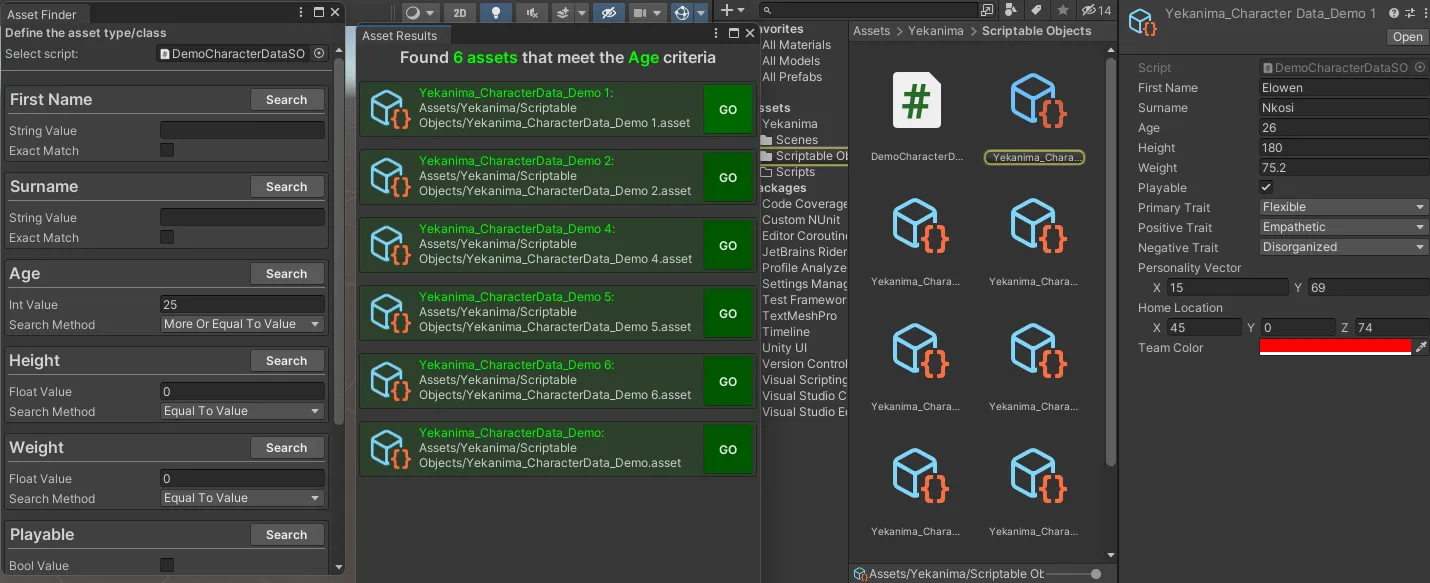
Asset Filter And Finder
Project Overview
- Role(s): Programmer
- Organization: None
🔧 Debugging Tool for Unity Asset Management
🛠️ Overview
This debugging tool is designed to streamline the asset search process for Unity developers. It allows for efficient searching of assets based on specific criteria and parameters within a designated type or class. Compatible with Scriptable Objects, Prefabs, Materials, and any other asset type that supports custom parameters, this tool enhances productivity and precision in asset management.
🌟 Key Features
- Efficient Asset Search: Search assets by custom parameters such as type, class, or other relevant criteria.
- Cross-Asset Compatibility: Works with various Unity asset types including Scriptable Objects, Prefabs, and Materials.
- Improved Asset Management: Provides a streamlined approach to asset handling, improving both speed and accuracy during development.
- Custom Parameter Support: Allows for precise searches using asset-specific parameters, reducing time spent on manual searches and improving workflow.
🔨 How It Works
🔍 Search by Criteria
Developers can filter and search assets based on specific criteria such as asset type, class, or custom parameters, allowing for efficient discovery of assets that match the required specifications.
🛠️ Custom Parameter Integration
The tool integrates seamlessly with any asset type supporting custom parameters, making it possible to search with precision and find assets based on project-specific criteria.
🧩 Challenges & Solutions
🔄 Challenge: Multi-Type Asset Search
Handling multiple asset types in one unified tool posed a challenge in ensuring consistent search performance and accuracy across different asset categories.
✔ Solution: I developed an efficient filtering system that allows seamless switching between asset types while maintaining search accuracy across various parameters.
⚙️ Challenge: Integration with Custom Parameters
Integrating custom parameters for different asset types without impacting performance was a significant challenge.
✔ Solution: I optimized the search engine to handle custom parameters for each asset type efficiently, ensuring that search results remain fast and accurate even with large projects.
🚀 Future Improvements
- Enhanced UI: Improve the interface to make it more intuitive and easier to navigate for developers at all experience levels.
- Integration with Third-Party Tools: Plan to integrate with popular asset management tools for broader compatibility and ease of use.
- Advanced Search Filters: Adding more advanced filters to allow developers to narrow down searches even further, such as by last modified date or asset dependencies.